Cause of the Error
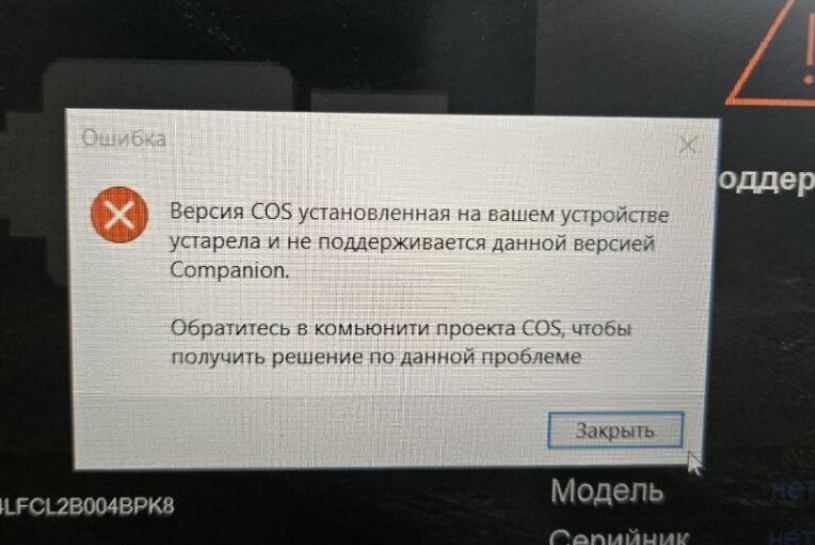
During a firmware update, the following message may appear::
“The installed ONE version is outdated and not supported by the current Companion version.”
This indicates that the version of the ONE system currently on your device is not supported by the version of Companion you are running.
To resolve this, reset the device to factory settings and perform a clean installation of the ONE software.
How to Fix the Error: Step-by-Step
Step 1: Reset the Device to Factory Settings
Before proceeding, ensure you have backed up all important data, as this process will erase all user files and settings.
Instructions:
Step 2: Install a Fresh Version of ONE
After the factory reset, install the ONE system from the beginning by following the official installation guide provided by the developer.
Step-by-step installation of ONE:
To ensure a successful installation, follow the official step-by-step guide meticulously.
Important Notes
During a firmware update, the following message may appear::
“The installed ONE version is outdated and not supported by the current Companion version.”
This indicates that the version of the ONE system currently on your device is not supported by the version of Companion you are running.
To resolve this, reset the device to factory settings and perform a clean installation of the ONE software.
How to Fix the Error: Step-by-Step
Step 1: Reset the Device to Factory Settings
Before proceeding, ensure you have backed up all important data, as this process will erase all user files and settings.
Instructions:
- Open the device's notification panel by swiping down from the top of the screen.
- Navigate to: Settings → System → Reset → Delete All Data (Factory Reset).
- Confirm the action to initiate the reset and wait for the process to complete.
- The device will restart automatically upon completion.
Step 2: Install a Fresh Version of ONE
After the factory reset, install the ONE system from the beginning by following the official installation guide provided by the developer.
Step-by-step installation of ONE:
To ensure a successful installation, follow the official step-by-step guide meticulously.
Important Notes
- New firmware can only be installed after performing a full device reset.
- Attempting an update without this reset will likely cause the installation to fail, and the original error will persist.
- To ensure compatibility and stability, always use the latest official versions of Companion and ONE, available directly from the COS Project website.